DozeAlert
Sleep peacefully. Arrive confidently.
Get DozeAlert on Android
Get DozeAlert on iPhone

- Open DozeAlert on the App Store on your iPhone.
- Install or update the app, then grant Location → Always and Notifications when you start a trip.
- Pick a stop or map pin, tap Start, and try locking the screen.
- Optional: install the Watch app from the iPhone Watch app → My Watch → DozeAlert.
About
DozeAlert helps commuters sleep peacefully and arrive confidently. Whether you’re on a train, bus, taxi, Uber, or another rideshare, DozeAlert monitors your trip and wakes you before you miss where you need to get off.
Android app tour → · iPhone app tour → · Apple Watch → · Wear OS →
- Trip-first Home: pick your stop or map destination, set wake timing, tap Start
- Transit Mode with stop countdown for supported public transit agencies
- Distance-only wake-ups when Transit Mode is off — taxi, Uber, Lyft, and more
- Pick a stop on your route, search the map, or jump to saved stops and saved lines
- Three-step onboarding: welcome, pick transit (multi-agency), guided permissions
- Three-step Home tour plus “Ready to sleep?” before monitoring begins
- My Trips tab for saved stops, saved lines, and recents
- Background monitoring with voice, vibration, and full-screen wake alerts
- Download agency stop lists for offline search (Settings → Transit)
- Trip history and missed-trip review in Settings
- Transit wake timing tuned per vehicle type (bus, train, subway, and more)
- Wear OS companion — trip status, start/stop, and dismiss alarms from your wrist (phone runs GPS and monitoring)
- Apple Watch companion — same wrist remote on iPhone: start/stop, dismiss, and glance status (phone runs GPS)
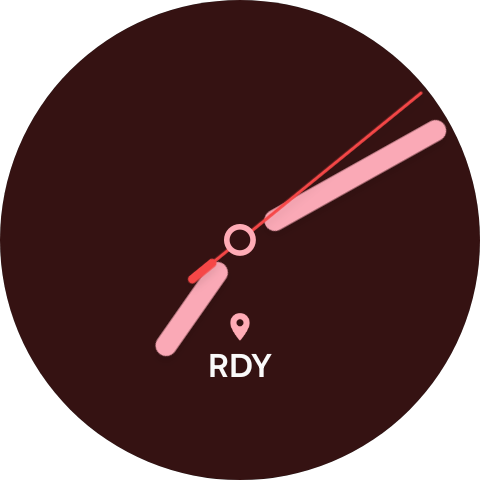
- Watch face complication — glance status like RDY, stop count, or OFF without opening the watch app (Wear OS and Apple Watch)
- Watch connection indicator shows live link status when the companion watch app is installed
- No account required — trip data stays on your device
Wear OS companion
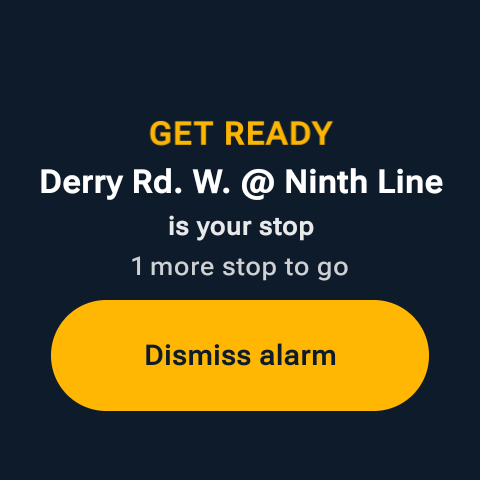
Pair a Wear OS watch with DozeAlert on your phone for at-a-glance trip status on your wrist — including a watch face complication that updates when you start or stop a trip on your phone. Start and stop controls and GET READY wake alerts live in the Wear app. Your phone keeps location, permissions, and background monitoring; the watch is a remote control and glance display.


Wear app tour → · Complication →
Apple Watch companion
The iPhone App Store app includes an Apple Watch companion — the same product model as Wear OS. Your iPhone keeps GPS, transit data, and wake logic; the Watch is a remote + glance surface: trip status, Start / Stop, dismiss alarm, Open on phone, optional face complication, and haptic wake alerts.


- Start or stop monitoring from your wrist
- See stops remaining or distance while the phone monitors in the background
- Dismiss GET READY on Watch or iPhone
- Optional complication for RDY / stop count / WAKE at a glance
- Settings on iPhone → Apple Watch for connection status and “Open watch app when trip starts”
- Install or update DozeAlert from the App Store on your iPhone.
- Open the iPhone Watch app → My Watch.
- Find DozeAlert under Available Apps and tap Install.
- Optional: edit a watch face and add the DozeAlert complication.
- Start a trip on phone or Watch, lock the phone, and confirm status + wake on your wrist.
Apple Watch in the app tour → · App Store install →
Permissions & privacy
DozeAlert needs clear permission choices to monitor trips reliably. First-time setup walks you through a short welcome, picking the transit you ride (one or more), granting permissions, and a guided Home tour. For monitoring on Android, set:
- Location: Allow all the time (not only while using the app)
- Notifications: Allowed (ongoing trip notification and alerts)
- GPS: Location services turned on
- Battery: Unrestricted recommended on some phones
We do not show ads, sell personal data, or require an account. Map search uses Google Maps Platform; optional transit stop list downloads use public open-data hosts. Read the full policy: Privacy Policy. Transit open data attributions and licence links: Transit Data Licenses.
Requirements
- Android 8.0 (Oreo) or later on phone — install from Google Play
- iPhone with iOS 16+ from the App Store
- Apple Watch on watchOS 10+ for the iPhone companion (optional)
- Wear OS 3+ on watch for the Android companion (paired with the phone app from Play)
- GPS / location services enabled
- Internet for map search and optional transit stop list downloads
- Background location and notifications for trip monitoring